Daily UI #004 · Mobile app
Calculator
EMI
A home loan EMI calculator: know your monthly payment and the true cost of your loan before you apply.
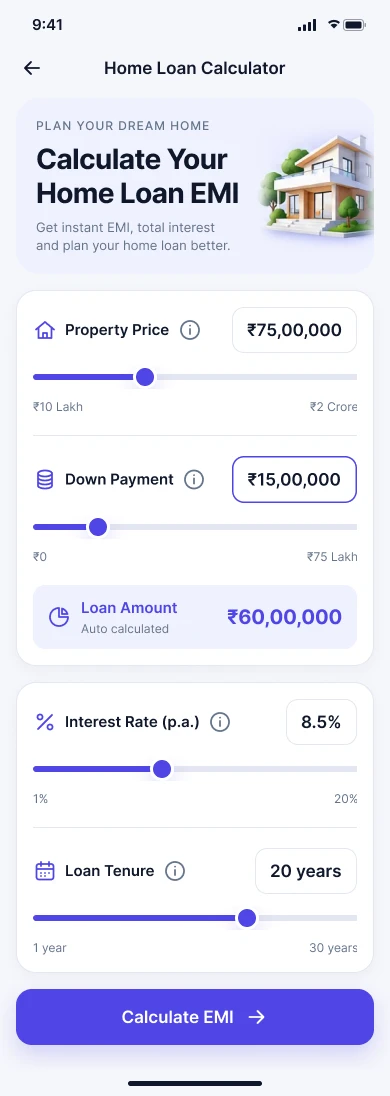
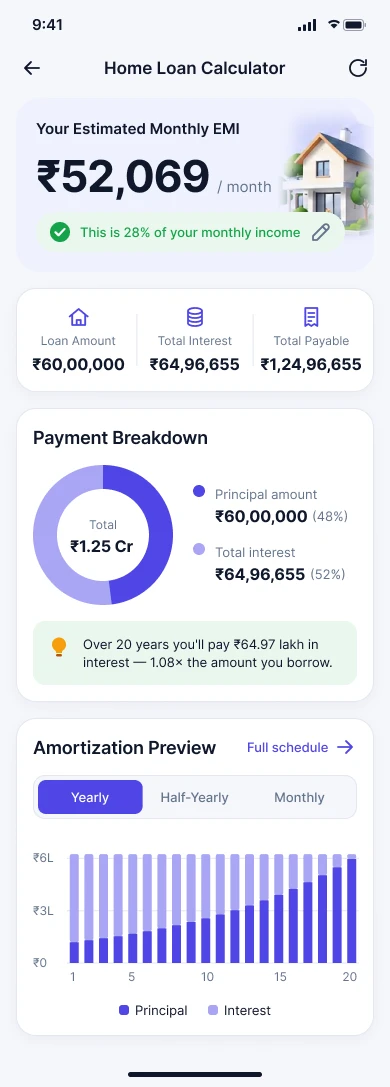
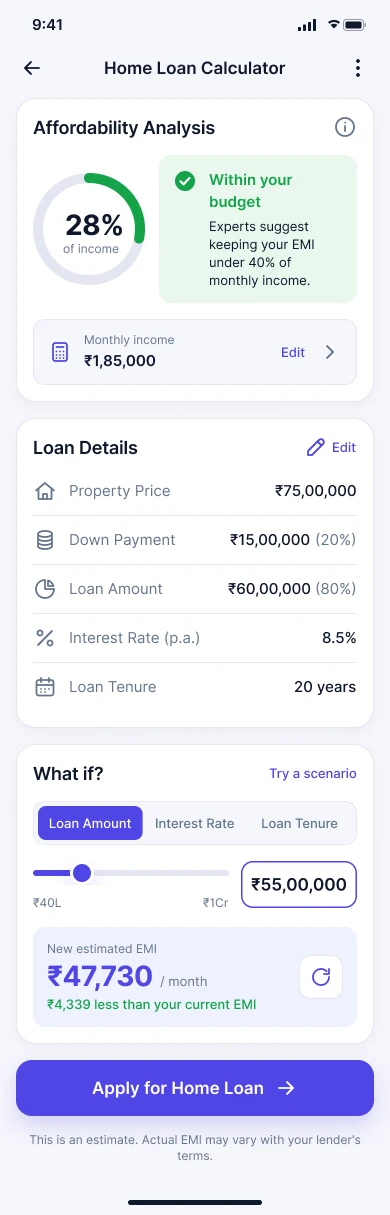
Hover the screens to scroll through them.
The brief
Help people estimate their monthly home-loan payment, and understand what the loan will really cost them overall.
Daily UI #004
“Design a calculation interface. It can be a standard, scientific, financial or specialty calculator.”
Concept
A home loan EMI calculator that estimates the monthly payment from property price, down payment, interest rate and tenure, then explains principal, total interest, total payment and affordability.
- Platform
- Mobile app, designed at 390 × 844.
- Why mobile
- Useful on the go, while browsing properties, comparing loans or discussing affordability.
Target user
- Persona
- Arjun, 30 · Working professional
- Goal
- Understand whether a home loan fits comfortably within his monthly budget.
- Needs
- Quick calculation, understandable numbers, easy scenario comparison, a clear total cost.
- Frustrations
- Financial jargon, complicated calculators, too many inputs, unclear results.
The problem
Financial calculators show lots of numbers without saying which one matters most. For a home buyer, the first question is simply: how much will I pay every month?
User goal
“I want to quickly calculate my monthly EMI and understand how much the loan will actually cost me.”
UX goals
- Make inputs easy to edit.
- Keep the monthly EMI visually dominant.
- Let people experiment with different loan scenarios.
- Cut the financial jargon.
- Explain principal versus interest clearly.
- Make invalid values easy to spot and fix.
Information architecture
User flow
- Property price
- Down payment
- Interest rate
- Loan tenure
- Calculate EMI
- Monthly EMI
- Breakdown
- Compare scenarios
Inputs & calculation
Sliders make exploring fast, while numeric fields give precision. The loan amount is worked out automatically, so there's one less thing to type.
- Property price
- Numeric input + slider
- Down payment
- Numeric input + slider
- Interest rate
- Percentage input + slider
- Loan tenure
- Year selector / slider
- Loan amount
- Calculated: property price minus down payment
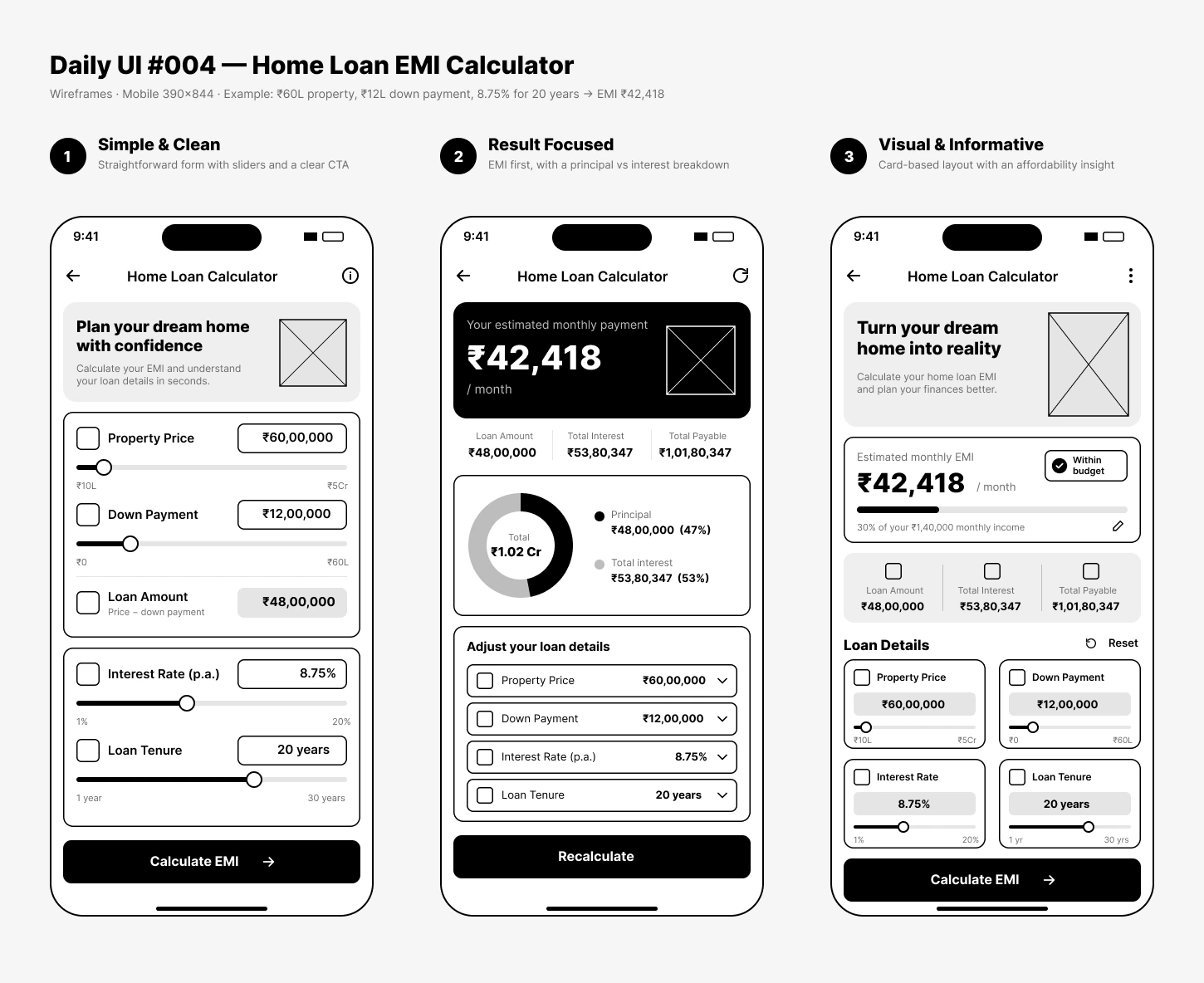
Wireframes
Three mobile directions, from a simple form to a full decision tool.
Results & insights
The monthly EMI is the most actionable number, so it's the biggest thing on screen. Everything else supports it.
Your estimated monthly EMI
₹52,069 / month
- Breakdown
- Principal versus interest as a simple chart, with the dense amortization schedule kept a tap away.
- Affordability
- An optional check of EMI against monthly income, clearly labelled an estimate, not financial advice.
- What if?
- Change one variable (amount, rate or tenure) and see the new EMI instantly. The calculator becomes a decision tool.
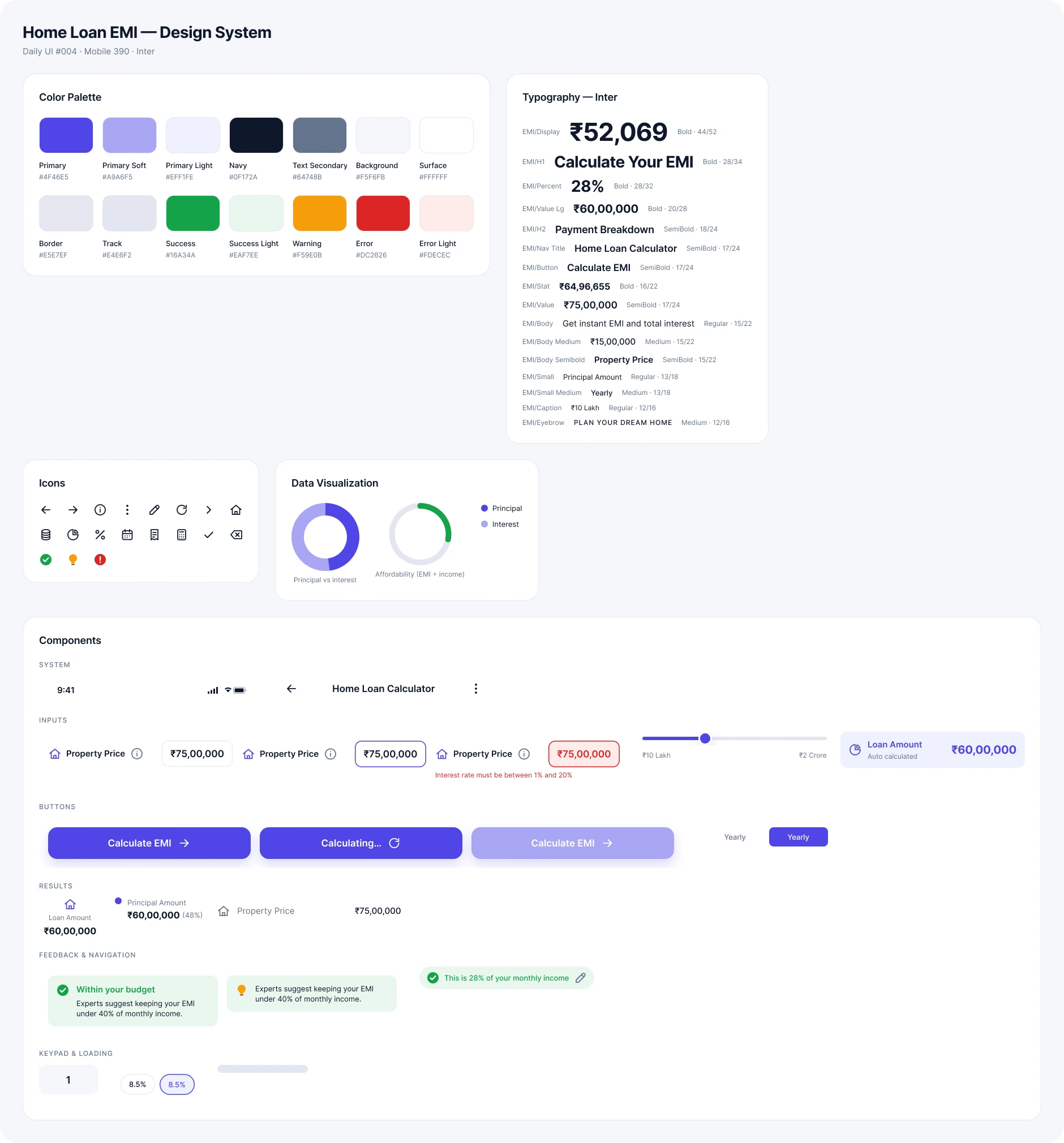
Design system
Clean, premium, financial and trustworthy: Inter with large numbers for the EMI, clear labels, rounded controls, soft shadows and generous spacing.
Final UI
The main flow, then the states around it. Soft surfaces and purple-blue accents keep a financial tool approachable without making it playful. Hover a screen to scroll it.
Calculator
Sliders and fields, with the loan amount calculated for you.
Result
The EMI first, then the breakdown and amortization preview.
Insights
Affordability against income, plus “What if?” scenarios.
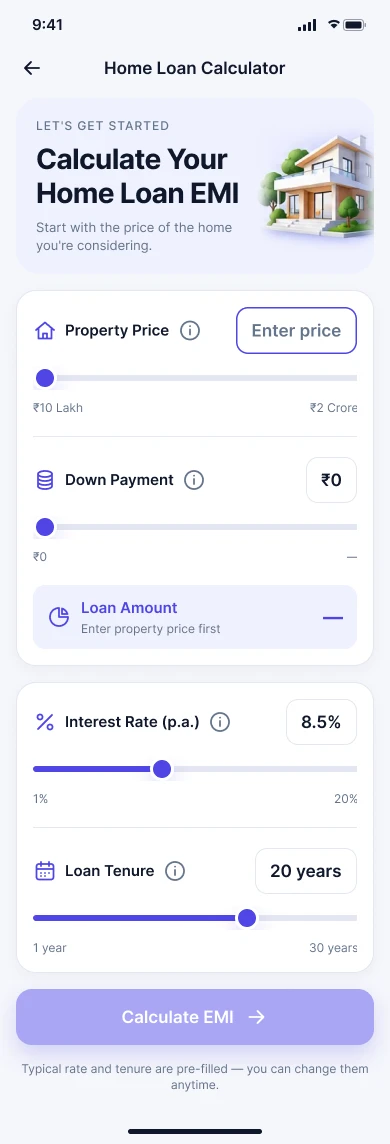
First time
Empty state with sensible guidance to get started.
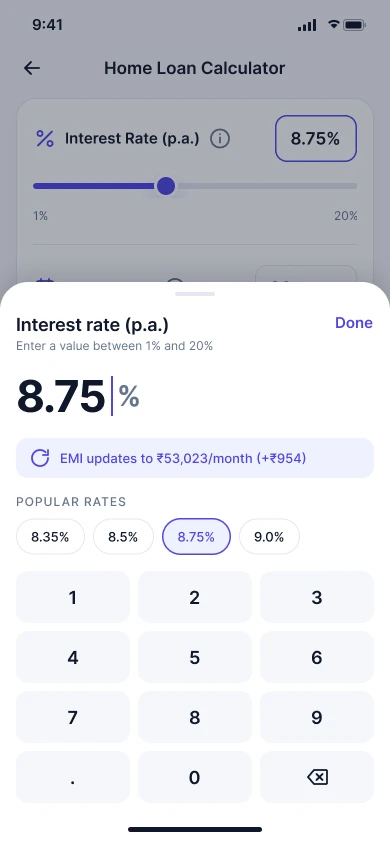
Editing
A keypad with popular rates and a live EMI preview.
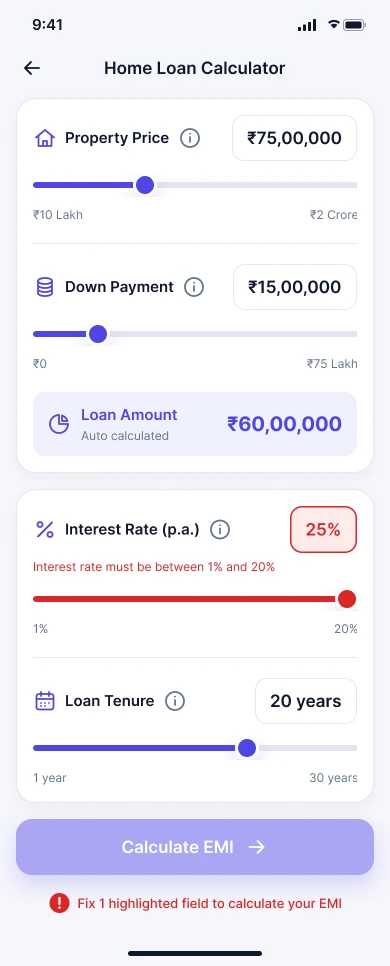
Invalid input
The field explains the allowed range right where it went wrong.
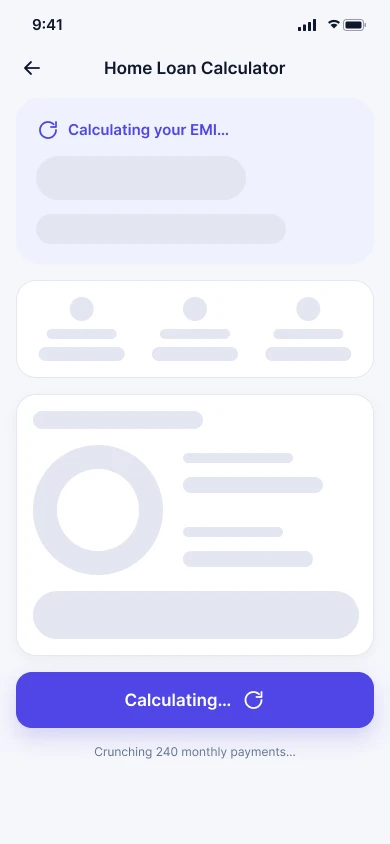
Calculating
Lightweight skeleton feedback while the result updates.
States & errors
Errors explain the fix, next to the field
- “Down payment cannot be greater than the property price.”
- “Enter an interest rate between 1% and 20%.”
- “Loan tenure must be between 1 and 30 years.”
Accessible & responsive
Mobile first, with large touch targets, visible labels, readable numbers and clear focus states. Charts never rely on colour alone, and the same structure can expand to tablet and web without changing the hierarchy.
Key decisions
- 01
Mobile first
Quick calculations on the go.
- 02
EMI first
The most important answer is the most dominant.
- 03
Sliders + inputs
Exploration and precision together.
- 04
Automatic loan amount
No unnecessary manual work.
- 05
Progressive detail
The first result stays simple.
- 06
Scenario planning
Built for comparing options.
- 07
Responsible messaging
Affordability guidance is never presented as guaranteed advice.
Reflection
Success means someone can enter loan details quickly, understand every input, get an estimated EMI, see the total cost, understand principal versus interest and try scenarios without confusion.
A good calculator isn't just about a mathematically correct number. It should help people understand what the number means and what decision to make, which is how this challenge grew from an EMI calculator into a small decision-support tool.
The full story
Read the full case study
The complete write-up: brief, user, flow, wireframes, design system, states and reflection.